Right, we'll start with the basics. In this tutorial we will create a project which will put a sprite on the screen. Very simple!
Start by downloading this zip file (21kb). Create a new directory on your hard drive and extract the two files into this directory.
Start up DXC and select "New project workspace" from the file menu. Create the project in the same directory as the one you created above. You will now have a new project with a blank editor and empty banks window.
Right-click on the banks window and select Create New -> Image (BMP).
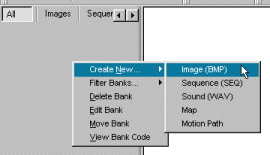

Right-click on the banks window and this time select Create New -> Sequence (SEQ). The Sequence editor will appear which we will use to create an animation sequence. Click on the sprite sheet on the left and enter these numbers into the fields on the right: Sprite X = 64 (the width of each frame), Sprite Y = 64 (the height of each frame), Sprite Count = 30 (there are 30 frames in total), X Count = 10 (there are 10 frames on each line in the sprite sheet). Select "Test" to see the animation.

|
//TUTORIAL 1 PART 1 //DEFINE VARIABLES 1 Global KEYPRESS$ //DEFINE PROCEDURES DefProc INIT_DISPLAY() DefProc CREATE_SPRITES() //---- START MAIN CODE ---- //CALL THE PROCEDURE TO CREATE THE SCREEN INIT_DISPLAY() 2 //CALL THE PROCEDURE TO CREATE THE SPRITES CREATE_SPRITES() //START LOOP - THIS LOOP WILL REPEAT UNTIL A KEY IS PRESSED Repeat 3
Update Display //THE INIT_DISPLAY PROCEDURE CREATES A SCREEN AND A PLANE Procedure INIT_DISPLAY() 4
Set Tile 0,0,1 Using Bank 50 //CREATE A TILE USING A BACKGROUND IMAGE IN BANK 1 Create Plane 1 Using Bank 50 //CREATE PLANE 1 USING THE MAP IN BANK 50 //SET WHITE TO BE TRANSPARENT INSTEAD OF DEFAULT BLACK AS OUR SPRITE CONTAINS BLACK PIXELS Set Bitmap 2 Transparency To 255,255,255 //THIS PROCEDURE WILL CREATE THE SPRITE Procedure CREATE_SPRITES() 5
Sprite On 1 //ENABLE THE SPRITE Sprites On //NOW TURN ON THE SPRITE SYSTEM EndProg |
 and click Start on the Run Time Debug Center. You should see a man walking in the middle of the screen.